This lesson explains how to match Candidates to Open Jobs from the within the Candidate Record.
Matching Candidates To Open Jobs
1. In this help file, we are going to cover exactly how you match a candidate to your current open jobs from within the candidate record. First of all, you will need to go to the candidate record itself and then go over to the action menu located on the right hand side.

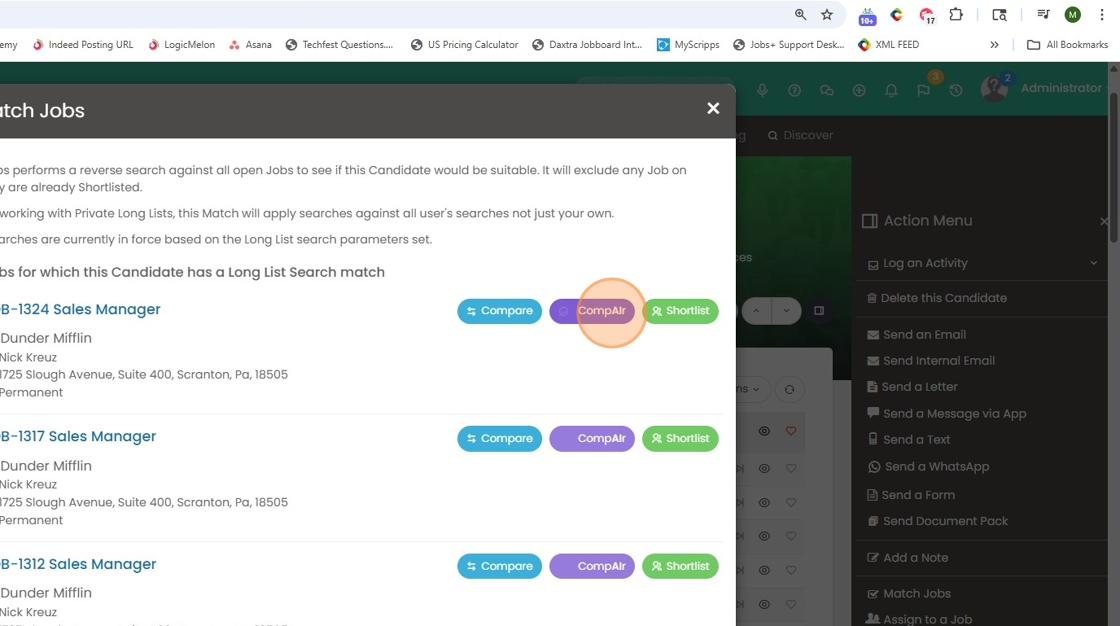
2. Scroll down to the match jobs field and then click on this field. Once you've clicked on this field, it will then match open jobs currently in the system that would be a good fit for that candidate based on their resume against the job description.

3. We have a couple of different options from this point. When you click on compare - that will pull through that job description and also the candidate resume, and compare them side by side.

4. Example.

5. CompAIr uses AI to compare the candidates resume with the job description, while highlighting their strengths or weaknesses - giving you a bit more to work with.
6. You can summarize, or hit compAIr Strengths.

7. Lastly, you can shortlist the candidate for any of the matched jobs from this screen.
